
In this article
The guest leaves at 11:00. The next one arrives at 14:00. In those three hours, someone has to get in, clean, change the bedding and check the whole flat: restock the amenities and toilet paper, make sure nothing was left dirty, nothing is missing and the guest didn't leave anything behind.
When it goes right, nobody notices. When it goes wrong, everyone does: the guest, who walks in to a dirty glass in the sink or the last guest's towel in the bathroom; the review, which drops; and the owner, who asks what happened.
I've been on both sides of this. A tight check-in, with the cleaning finishing at the last minute. And a last-minute same-day booking, with everyone rushing to get the flat ready in time. On those days, what saves you isn't speed: it's knowing in advance what needs to happen, and when.
This article is about that gap, and about what changes when it stops depending on someone's memory.
Why operations fail
It's almost never a lack of care. It's a lack of place.
- The booking is on Airbnb, the cleaner is on WhatsApp and the schedule is in the manager's head.
- The cleaning is arranged by message, the day before, and depends on someone remembering to send it.
- Maintenance that should be regular turns into “whenever”, until the air conditioning breaks down mid-stay.
- And the cost of the cleaning lives in a chat, not in the owner payout.
With two properties, you can keep it all in your head. With ten, operations start slipping on exactly the busiest days.
1. Cleaning starts from the booking
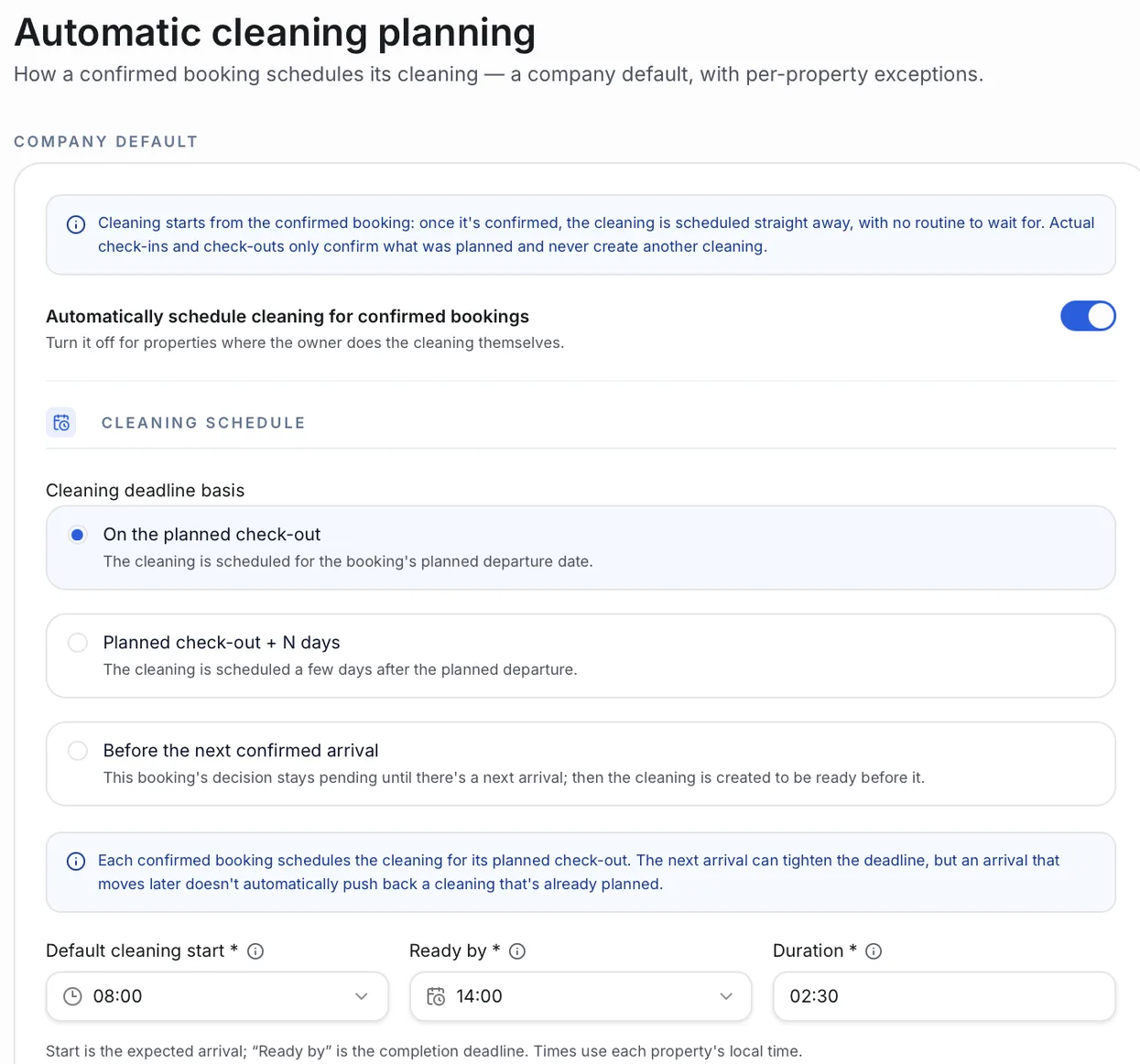
The first step is to stop creating cleanings by hand. In Operent, with automatic planning turned on, every new confirmed booking gets its cleaning, with a time, a deadline and instructions, following the rule you choose. Bookings already confirmed before you turned it on stay as they were. There are three rules:
- On the planned check-out. The cleaning is set for the departure day. The default for high turnover.
- Planned check-out + a few days. For properties where cleaning can wait, for example when the team comes on fixed days.
- Before the next confirmed arrival. The decision stays pending until there's a next guest, and then the cleaning is created to be ready before them. No cleaning an flat that's going to sit empty.
There's a company default with per-property exceptions. One property can have its own rule, and another can schedule no cleaning at all, when the owner takes care of it.
Cancellations are automatic too: if the booking is cancelled before check-out and its cleaning has no cost recorded yet, the task is cancelled and kept in the history. Nobody sends the cleaner to a flat that isn't getting a guest. If a cost has already been recorded, or the task is completed, it stays, to keep the operational and financial history.
Instructions are saved too: “clean the air conditioning filter”, “take the bedding to the laundry”. They're copied into every new cleaning, so nobody has to repeat them.
2. Knowing whether the property will be ready in time
A cleaning from 11:00 to 14:00, with check-in at 14:00, has no margin at all. A cleaning with the next guest two days away has room to spare.
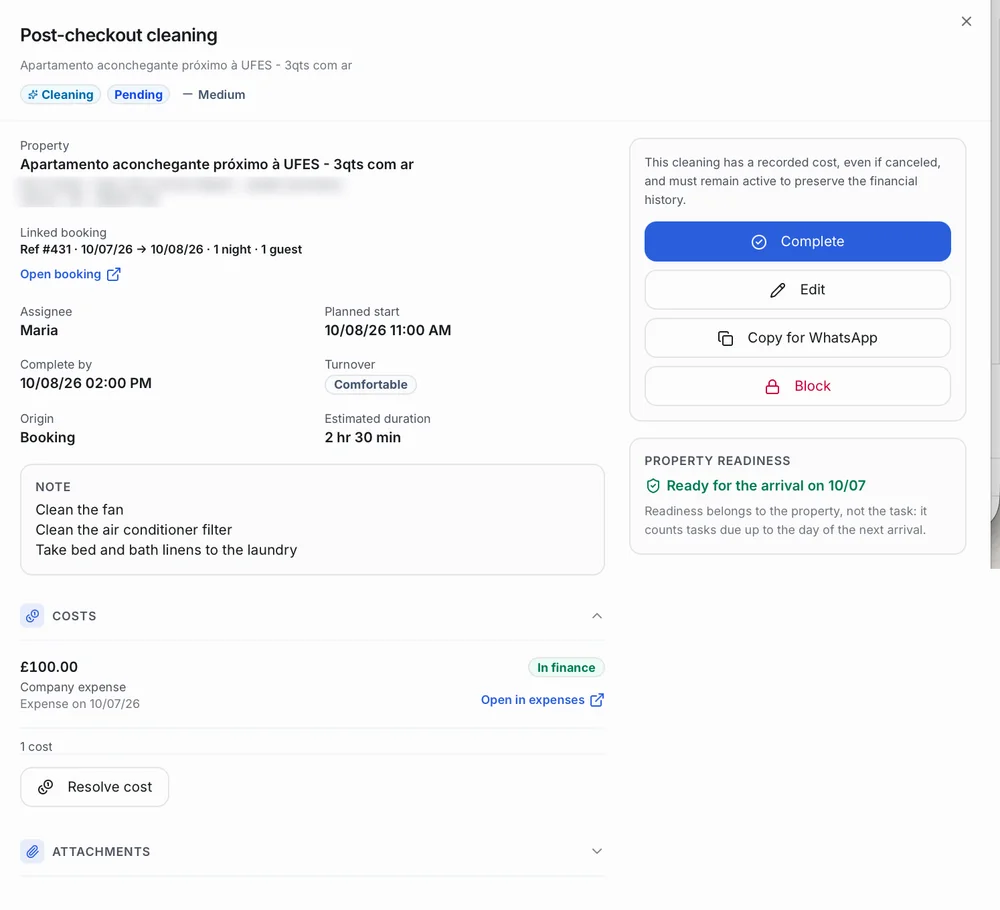
Operent shows this on every task. The Turnover field sums up the time until the next arrival: “Same day” means the next check-in is on the check-out day; a tight window means the deadline is short; “Comfortable” means there's more time for the job. The readiness panel tells you whether the property is ready for the next guest. Readiness belongs to the property, not the task: it counts the property's tasks due up to the day of the next arrival.
3. What repeats becomes a routine
Not every task starts from a booking. Professional air conditioning cleaning every 6 months, replacing the water filter cartridge, a fortnightly or monthly inspection, restocking supplies: that's routine, and routine shouldn't depend on reminders. It's exactly the task that gets forgotten most, because it goes months without needing anyone.
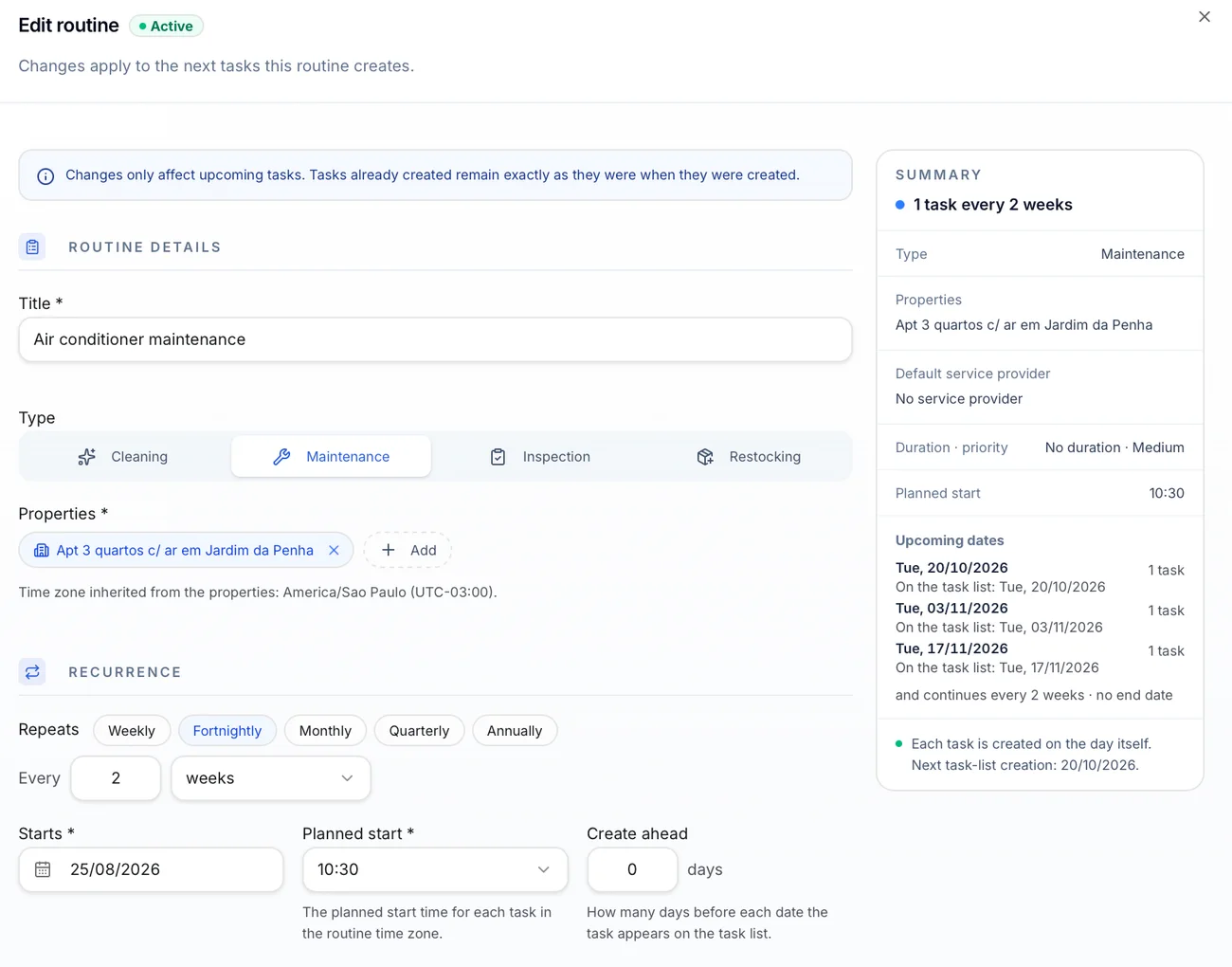
A routine sets the type (cleaning, maintenance, inspection or restocking), the properties, how often it repeats, the time and how many days ahead the task shows up in the schedule. You set it up once, and the routine creates one task per property on each date. Three properties on a monthly routine means three tasks a month.
The inspection after each departure is another piece: checking whether anything is missing or broken, and whether the property is ready for the next guest. It can be created as an inspection task linked to the booking, and based on what it finds, the manager adds the maintenance that's needed.
4. The day starts with what needs action
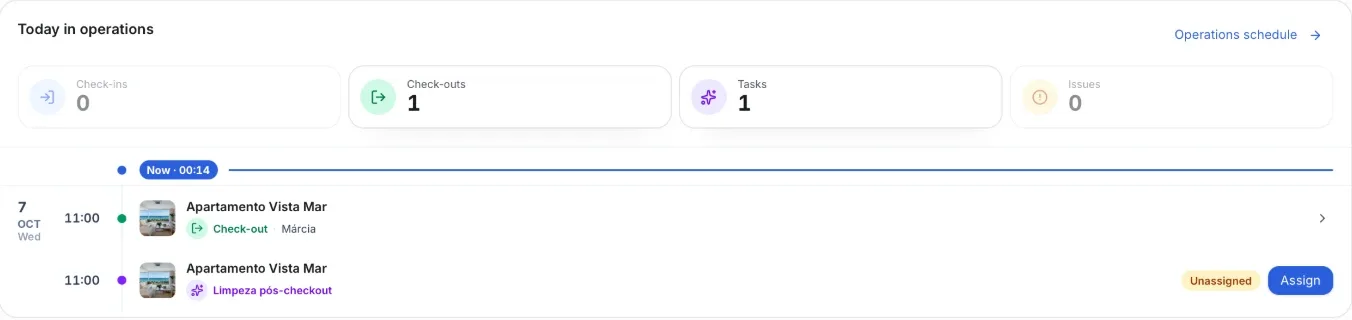
When you open Operent, the first screen answers the morning question: what's happening today?
- the day's check-ins, check-outs and tasks, on a timeline;
- what's overdue, unassigned or has an open payment, set apart as needing attention;
- and the week's upcoming activity, day by day.
In the task list, the filters do the same job: overdue, tight today, unassigned, unscheduled.
5. Sending it to the team without retyping
If your team doesn't use Operent, the system makes passing the schedule on easier in two ways.
One task at a time. Every task has a Copy for WhatsApp button that builds the ready-made message with that cleaning's details:
You open the chat with your cleaner on WhatsApp and paste it. No retyping the address, times and instructions.
The whole schedule, in advance. The task list exports to a spreadsheet (Excel), with property, address, task, assignee, date and time. You can send the week or the month in one go, before it starts.
When the cleaner says they're done, the manager marks the task as completed and can attach a photo or a receipt. Completing it is always the manager's call: the system doesn't assume the job was done.
6. The task that becomes a result
This is where operations meet the finances.
A cleaning has a cost. Completing the task doesn't record it: you add the cost separately, on the task itself, checking the amount, account, date and who pays. As a company expense, it becomes the company's expense; as a deduction from the payout, it comes out of the owner's amount and shows on their statement; if the owner paid directly, it's recorded for information and counts toward the property's result without touching your cash. The entry stays linked to the property and the task it came from, and the task links to it.
Every task also keeps a history of what changed, by whom and when.
There isn't one spreadsheet for operations and another for money. The same cleaning that was scheduled, done and completed is the one that goes into the month's numbers.
If you've read what Operent is, you know the question: who paid? In operations, it starts with the task.
What this doesn't replace
- It doesn't replace your team or your arrangement with them. Operent organises what needs doing and when; your team still does the work.
- It doesn't replace your PMS or channel manager. Bookings keep coming from where they come from; what changes is what happens after them.
Frequently asked questions
Do I need a rule for every property?
No. You set the company default once, and only customise the properties that don't follow it.
If a booking changes dates, does the cleaning move too?
Yes. If the booking's own dates change, its cleaning is rescheduled automatically, following the property's rule. The next arrival works differently: an earlier one can tighten the cleaning deadline; a later one doesn't automatically push back a cleaning that's already planned.
Does my team need access to Operent?
Not necessarily. If they don't use it, you copy each task's ready-made message to WhatsApp or export the schedule as a spreadsheet.
Can I create a one-off task?
Yes. Besides automatic tasks and routines, any task can be created manually.
Conclusion
Holiday let operations are made of short gaps: between one departure and the next arrival, between one maintenance job and the next. When they depend on memory, they fail on the busiest days. When they start from the booking and the routine, they're visible before they become a problem, and the cost of each one lands in the right place in the financials.
Operent is in early access and free during validation. I want to run my operations on Operent
In this articleearly access
See this flow with your own properties.
Operent is in early access and free during the validation phase. We stay close through your setup and your first month-end close.